The Technical Architecture Behind Worlds: Gaussian Splatting in a Node-Based AI Canvas
The Technical Architecture Behind Worlds: How Raelume Integrated Gaussian Splatting Into a Node-Based Canvas
Gaussian splatting has been one of the most significant developments in 3D reconstruction since its academic introduction in 2023. The technique represents 3D scenes using millions of overlapping ellipsoids (splats), each with defined position, color, opacity, and covariance parameters. When rendered from a viewpoint, these splats blend together to produce photorealistic imagery at real-time speeds on consumer hardware.
The challenge has always been accessibility. Running Gaussian splatting pipelines typically requires Python environments, CUDA configurations, and command-line familiarity. Creative tools that generate 2D content have stayed firmly in 2D territory.
Raelume just shipped Worlds blocks, bringing Gaussian splatting directly into their node-based AI canvas. Here's a technical breakdown of what they built and how it compares to other approaches.
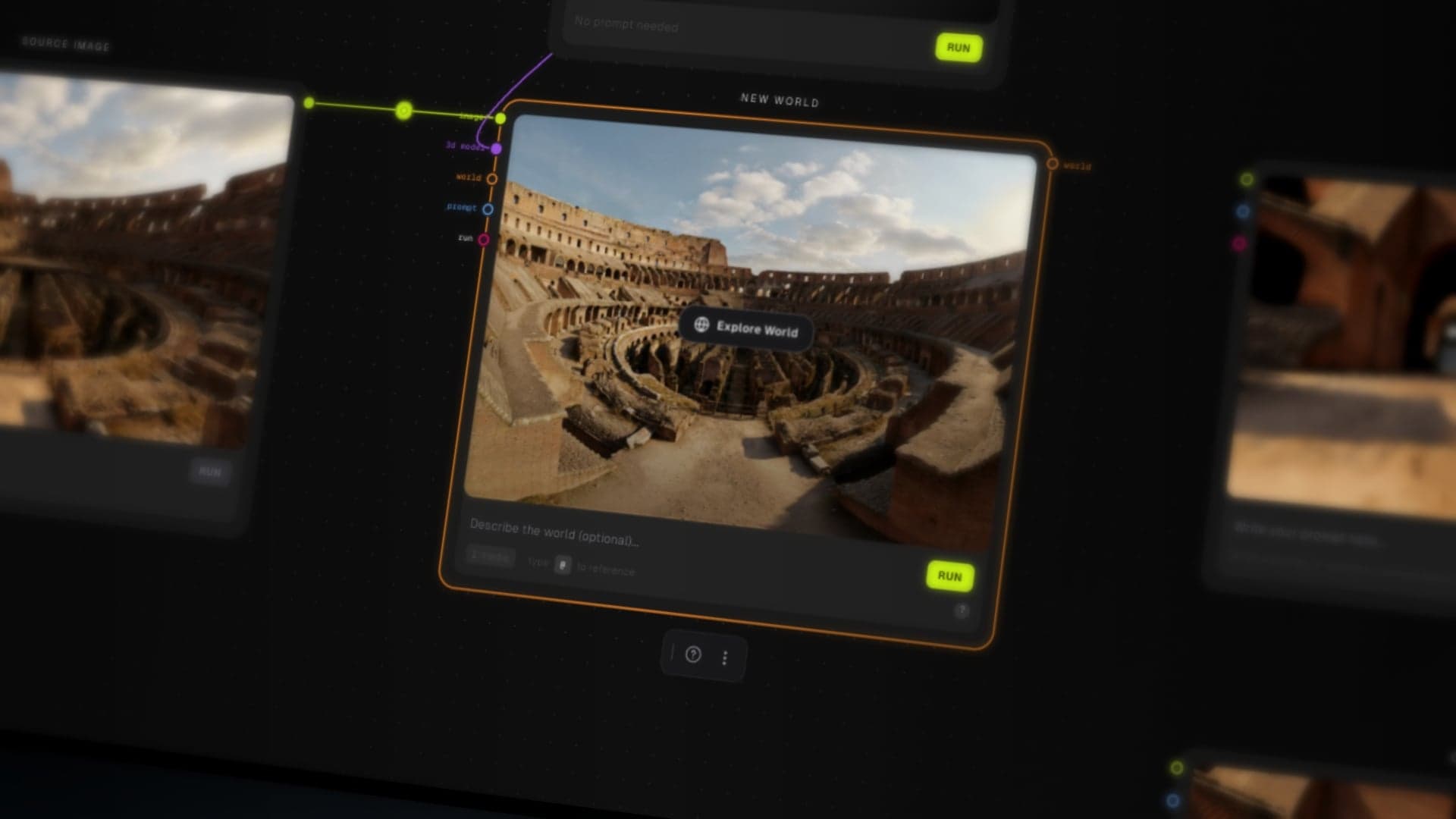
 Raelume's Worlds blocks: turning 2D images into explorable 3D Gaussian splatting environments.
Understanding the Technical Foundation
Gaussian Splatting vs. NeRF
Before Gaussian splatting, Neural Radiance Fields (NeRF) dominated the neural 3D reconstruction space. NeRF encodes scenes as continuous volumetric functions, requiring neural network queries at every sample point during rendering. This produces high-quality results but at significant computational cost.
Gaussian splatting takes a fundamentally different approach. Instead of implicit neural representations, it uses explicit geometric primitives. Each 3D Gaussian is defined by:
- Position (μ): 3D center point
- Covariance matrix (Σ): 3x3 matrix defining shape and orientation
- Opacity (α): transparency value
- Spherical harmonics coefficients: view-dependent color encoding
During rendering, these Gaussians project onto the 2D image plane as 2D Gaussians, sorted by depth and alpha-composited front to back. The key advantage: this rasterization pipeline runs efficiently on standard GPU hardware, achieving real-time framerates where NeRF requires seconds per frame.
Single-Image 3D Reconstruction
Traditional Gaussian splatting workflows require multiple input images from different viewpoints, typically 50-200 photos, to reconstruct a scene. The optimization process finds Gaussian parameters that minimize rendering error across all training views.
Single-image 3D reconstruction is a harder problem. With one view, the algorithm must infer:
- Depth relationships from monocular cues
- Occluded regions that aren't visible
- Consistent 3D geometry from 2D appearance
Raelume's Worlds blocks handle this inference internally. The system analyzes the input image for depth cues (perspective lines, occlusion patterns, atmospheric depth, known object sizes) and generates a plausible 3D reconstruction. Areas with strong depth signals reconstruct accurately; areas with ambiguous depth get reasonable estimates.
Architecture Within the Node-Based Canvas
The Block Interface
Worlds blocks function like any other node in Raelume's canvas architecture. They accept connections from:
- Image nodes (generated or imported)
- Prompt blocks (for scene guidance)
- Other Worlds blocks (for multi-world composition)
- 3D object blocks (for scene population)
Outputs include:
- The 3D environment itself (viewable in fullscreen mode)
- Captured images at 1K, 2K, or 4K resolution
This design philosophy matters from an integration standpoint. Rather than building Gaussian splatting as a separate application that requires export/import workflows, Raelume made it a native canvas element. A captured image from inside a World immediately becomes an Image node, ready for downstream processing through the same 70+ AI models available on the platform.
Multi-World Composition
The technical implementation of multi-world merging is interesting. When you connect multiple Worlds blocks:
- Each source generates its own Gaussian splat representation
- The system performs spatial registration to align coordinate spaces
- Overlapping regions blend based on confidence scores
- The merged environment maintains real-time rendering performance
This enables creative workflows like combining separately generated foreground and background elements, or merging environments with different aesthetic styles.
3D Object Integration
The 3D block system allows importing external objects into Worlds environments. Each imported object:
- Converts to a format compatible with the splat renderer
- Gets position, rotation, and scale transform controls
- Renders within the same rasterization pipeline as the environment splats
This isn't a full 3D scene graph implementation, but it's sufficient for art direction purposes.
Comparison: Raelume Worlds vs. Other Approaches
Google Genie 3
Google's Genie 3 represents a different paradigm entirely. It's a world model that generates environments dynamically based on user actions. The AI predicts what exists around corners, what happens when you interact with objects. It runs at 20-24 fps and produces genuinely interactive experiences.
The tradeoff: Genie 3 is a research prototype available only through Google Labs for specific subscribers. It doesn't connect to any production workflow. You can explore environments but not export them, compose them, or integrate them into a creative pipeline.
Raelume's approach prioritizes integration over interactivity. The environments are explorable but static. The value proposition is workflow continuity, not real-time world generation.
ComfyUI Gaussian Splatting Extensions
The open-source ComfyUI community has developed Gaussian splatting extensions, notably ComfyUI-3D-Pack and ComfyUI-Sharp. These provide similar conversion capabilities to Raelume's Worlds blocks.
Key differences:
Installation complexity: ComfyUI extensions require Git cloning, Python dependency management, and often CUDA configuration. Raelume's implementation requires zero setup.
User interface: ComfyUI is developer-focused. Worlds blocks include a fullscreen explorer with intuitive camera controls designed for creative users.
Object composition: ComfyUI extensions focus on the splat generation itself. Raelume adds the multi-world and 3D object composition layer on top.
Capture workflow: In ComfyUI, rendering specific viewpoints requires additional node configuration. Raelume's capture button drops images directly back onto the canvas.
For developers comfortable with Python and node-based programming, ComfyUI offers more configurability. For creative teams who want the capability without the overhead, Raelume's implementation is more accessible.
Standalone Gaussian Splatting Tools
Several standalone applications handle Gaussian splatting conversion: Luma AI, Polycam, various research implementations. These work well for their specific purpose but don't integrate with AI generation workflows. You generate an image in one application, export it, convert it in another application, export the result, import it elsewhere.
Raelume eliminates those boundaries by putting everything on one canvas.
 See Worlds in action: full documentation and demo
Performance Characteristics
From testing, some observations on performance:
Conversion time: Image to Worlds conversion takes several seconds depending on image complexity. The system appears to run depth estimation and splat optimization in sequence.
Rendering performance: Once generated, environments render in real time on standard hardware. The Gaussian rasterization pipeline is well-optimized for modern GPUs.
Capture resolution: 4K captures show good detail retention. The splat representation preserves high-frequency details better than some neural implicit approaches.
Memory usage: Large or complex environments increase memory footprint. The explicit splat representation scales with scene complexity.
Developer Considerations
For developers evaluating whether to integrate Gaussian splatting capabilities into their own tools:
Build vs. integrate: Building Gaussian splatting from scratch requires significant investment in 3D graphics, optimization algorithms, and rendering pipelines. For most teams, integrating existing solutions makes more sense.
The accessibility gap: The core technology exists. Open-source implementations work. What's missing in most tools is the user experience layer. Raelume's contribution isn't the splat algorithm, but wrapping it in an interface that non-technical users can actually navigate.
Workflow integration patterns: The node-based approach demonstrates a pattern worth considering: 3D as a composable element rather than a destination format. Input flows in, 3D environment exists transiently, outputs flow back into the pipeline.
Future Implications
Raelume has VR viewing on their roadmap, which is the logical next step. Once environments render in real time on desktop, rendering them in a headset is incremental rather than transformational.
The broader implication is that 3D capability is becoming table stakes for AI creative tools. Google's investment in Genie 3 signals where the research frontier is heading. Raelume's implementation shows how production tools can start incorporating spatial content today.
The gap between AI-generated 2D content and spatial computing platforms (Vision Pro, Quest, etc.) is closing. Tools that can bridge that gap have a structural advantage as the industry moves toward more immersive content formats.
Bottom Line
Raelume's Worlds blocks represent a practical implementation of Gaussian splatting within a node-based creative workflow. The technology isn't novel in isolation, but the integration architecture solves real workflow problems.
For technical users: this is Gaussian splatting without the Python setup, accessible through a drag-and-drop interface.
For creative teams: this is 3D capability without the Blender learning curve.
For platform architects: this is a reference implementation of how to integrate neural 3D reconstruction into a composable tool ecosystem.
The feature is live now. VR support is coming. Worth evaluating if your workflow touches anything spatial.
Alex Mercer reviews AI creative tools as an independent writer. No affiliations, no sponsorships.

